Your AI Coding Assistant Is Guessing. Most People Don't Realize That.
Originally published on LinkedIn on 2026-04-18. Republished here by Akash GR.
I've been thinking about this for a while and I think we're building on a shaky foundation.
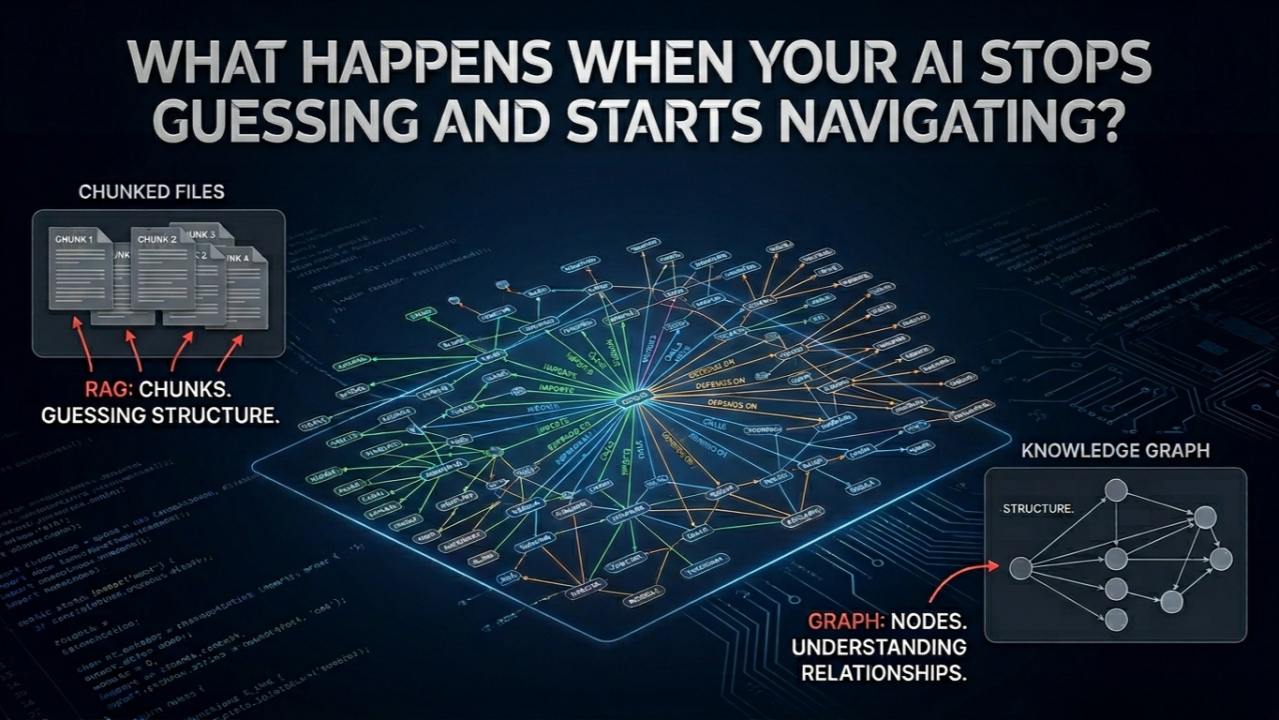
Every AI coding assistant: Claude Code, Cursor, Codex hits the same problem nobody talks about openly. Your codebase doesn't fit in a prompt. So the AI splits everything into chunks, finds the closest-matching pieces, and responds. That's RAG. It works. But it's not the same as understanding.
Here's what RAG can't tell you: who calls whom. Which module everything else depends on. Why a particular architectural decision was made two years ago and only exists in a commit message nobody reads anymore.
It finds text that looks similar. It doesn't know the structure.
What changes when you add a knowledge graph
Instead of chunks, you get nodes, classes, functions, decisions. Instead of similarity scores, you get actual relationships, this imports that, this calls that, this decision exists because of that constraint.
The AI stops guessing and starts navigating.
On a 52-file mixed codebase, querying a knowledge graph costs around 1,700 tokens. Reading raw files costs 123,000. That's a 71x difference and more accurate, because you're querying structure, not text.
How we can use Graphify for this and what actually changes
Graphify is an open-source tool that builds this knowledge graph from your codebase, code, docs, PDFs, architecture diagrams, all of it and wires it into your AI assistant. Here's what concretely changes once it's in your workflow.
Architecture questions get real answers. When you ask "why does this module exist" or "what breaks if I change this function" your AI is reading a map of the actual system, not hunting through files hoping to find the right chunk. The answers stop being vague and start being specific.
God nodes become visible. Every codebase has them files that 30 other things depend on but nobody formally documented. Graphify surfaces these automatically in a plain-English report. Before any refactor, you know exactly what you're touching. No more "I didn't know that was connected to this."
Onboarding to an unfamiliar codebase drops from days to hours. Point Graphify at a repo you've never seen and it generates a summary of the architecture, the high-dependency files, and the unexpected connections worth knowing about. You're not starting blind.
Context doesn't reset between sessions. Once the graph is built and wired into your AI assistant, it reads the map before it reads anything else. You're not re-explaining the system every time you open a new chat. The AI already knows where things live and how they connect.
Cross-file reasoning actually works. This is the one that surprised me most. Questions that span multiple modules data flow, dependency chains, why two unrelated-looking files are coupled these are where RAG falls apart and graph traversal holds up.
What to be careful about
Graphify tags every relationship as EXTRACTED (directly found in source), INFERRED (a reasonable guess with a confidence score), or AMBIGUOUS (flagged). The inferred edges are useful but don't treat them as facts. Always check the tag before making a decision based on a connection the AI surfaced.
Also a stale graph is worse than no graph. If you build it once and stop updating it, your AI is navigating an outdated map. Treat the graph as part of the codebase, not a one-time report.
Most people are still optimizing how AI retrieves information. The more interesting problem is giving it something worth retrieving from a structured representation of how your system actually works, not just a pile of files it has to guess through.
That's the gap knowledge graphs close.
If you're working on a large codebase with an AI assistant, curious what context problems you're running into.
Sources and scope
The token comparison comes from Graphify’s published worked examples. It describes a particular 52-file corpus; savings vary with the corpus and query. It should not be read as a guarantee for every codebase.
Retrieval and knowledge graphs can complement one another. Coding assistants also use tools and other context strategies; the discussion above describes limitations of text retrieval alone.